
Remove Line Breaks & Clean Text Formatting Online: The Complete Beginner Guide

Have you ever copied text from a PDF, email, or website and ended up with a messy block of text full of random line breaks?
Maybe the paragraphs look disjointed…
Or spacing looks broken…
Or your text becomes almost impossible to read?
You’re not alone.
This is one of the most common formatting issues people deal with. And that’s exactly why the Remove Line Breaks & Clean Text Formatting tool on ConvertioHub exists—to help you fix messy text instantly with just one click.
In this guide, you’ll learn how line breaks happen, how to remove them properly, and how to use ConvertioHub’s free tool the right way.
What Are Line Breaks? (Beginner Explanation)
Line breaks are simply points where text jumps to a new line even though it shouldn’t.
You’ll usually see them when copying content from:
- PDF documents
- Emails
- Word files
- Websites
- Chat messages
These line breaks often appear because different apps use different formatting systems. When pasted somewhere else, the formatting doesn’t translate well—so you get:
- Broken paragraphs
- Extra spaces
- Random line jumps
- Unreadable text
This is where an online text cleaner becomes helpful.
Why Removing Line Breaks Improves Readability
Cleaning text formatting isn’t just about making things look neat—it solves real-world problems.
Better readability
Properly formatted text flows naturally. No awkward spacing, no broken sentences.
Perfect for social media posts
Platforms like X, LinkedIn, or Facebook need clean formatting for clarity.
Great for students & professionals
Whether you’re preparing notes or working on documents, tidy paragraphs make everything easier to understand.
Helps bloggers & content creators
When copying snippets from sources, tools, or PDFs.
Enhances editing experience
Clean text is easy to modify, export, repurpose, or reformat later.
H2: How to Use ConvertioHub’s Remove Line Breaks Tool (Step-by-Step)
Using ConvertioHub is extremely simple—anyone can do it in seconds.
Follow this quick guide:
Step 1 — Paste Your Text
Go to: Remove Line Breaks — Clean Text Formatting Online
Copy your messy text and paste it into the main input box.
Step 2 — Choose Your Cleaning Options
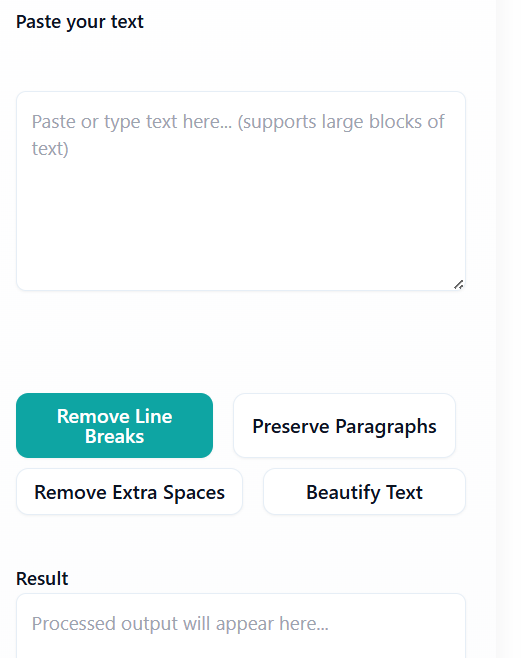
You may see options like:
- Remove line breaks
- Remove multiple spaces
- Fix paragraph spacing
Select whichever ones you need.
Step 3 — Click “Clean Text”
Click the Clean Text (remove the line breaks) button to instantly fix your formatting.
Step 4 — Copy the Cleaned Output
Your cleaned text will appear in the output box below.
Now you can copy it and use it anywhere—emails, documents, blogs, notes, or social media.
It doesn’t get easier than this!
H2: Benefits of Online Converters vs Software
Why use an online tool like ConvertioHub instead of installing a program?
1. No installation needed
Just open the page and start cleaning your text.
2. Works on any device
Mobile, desktop, tablet — everything works instantly.
3. Much faster
Traditional editing tools require more steps. ConvertioHub fixes your text in seconds.
4. Free to use
No subscription, no paid software.
5. Private & secure
Text is processed instantly and not stored.
FAQs (Beginner-Friendly Answers)
1. What does “remove line breaks” mean?
It means deleting unwanted new lines that appear in your text, making your paragraphs flow smoothly again.
2. Why does pasted text look messy?
Different apps use different formatting. When copied, the formatting breaks, causing extra line jumps.
3. Is ConvertioHub’s text cleaner free?
Yes! It’s completely free, and you don’t need to install anything.
4. Can I clean large amounts of text?
Absolutely — the tool can handle long paragraphs, essays, articles, and documents.
5. Will my text be saved or stored?
No. Your text is processed instantly and not stored on the server.
Conclusion + Strong CTA
Messy text full of random line breaks can make documents hard to read, edit, or share.
But with ConvertioHub’s Remove Line Breaks & Clean Text Formatting tool, you can fix everything instantly—no experience or software required.
Whether you’re a student, writer, editor, or everyday user, this tool will make your text cleaner, clearer, and more professional in just one click.
👉 Try the tool now for free on ConvertioHub.com and clean your text instantly!