
Introduction: Why You Need a Barcode Generator Today
Barcodes are everywhere. From retail stores and warehouses to online shops and product packaging, barcodes help businesses track, manage, and sell products efficiently.
But creating barcodes manually or using paid software can be confusing, expensive, and time-consuming — especially for beginners.
That’s where a free barcode generator online becomes useful.
With the ConvertioHub Barcode Generator, you can create professional barcodes in seconds, directly in your browser — no downloads, no signup, and no technical skills required.
Beginner Explanation: What Is a Barcode Generator?
A barcode generator is a simple online tool that converts numbers, text, or product codes into a scannable barcode image.
These barcode images can be:
- Printed on labels
- Added to product packaging
- Used in inventory systems
- Scanned by barcode readers or mobile phones
You just enter your data, choose a barcode format, and generate it instantly.
Understanding Common Barcode Formats (Beginner-Friendly)
Different barcodes are used for different purposes. Here are the most common ones, explained simply:
1D Barcodes (Traditional Barcodes)
These are the classic black-and-white lines you see on products.
Examples include:
- Code 128
- EAN-13
- UPC
Best for: Retail products, inventory tracking, shipping labels.
2D Barcodes (Matrix Style)
These store more information in a compact space.
Example:
- QR codes (for URLs, contact info, menus)
Real-Life Uses of Barcodes
Barcodes are not just for big businesses. They are used daily in simple, practical ways:
- Product labeling for online stores
- Inventory management in small shops
- Warehouse tracking and logistics
- Pricing and checkout systems
- Asset tracking in offices
- Event tickets and passes
They also support:
- High-quality printing
- Logo-friendly layouts
- Easy editing and regeneration
- Transparent backgrounds for design use
How to Create a Barcode Online (Step-by-Step Guide)
Creating a barcode using ConvertioHub is extremely easy. Follow these steps:
Step 1: Open the Barcode Generator
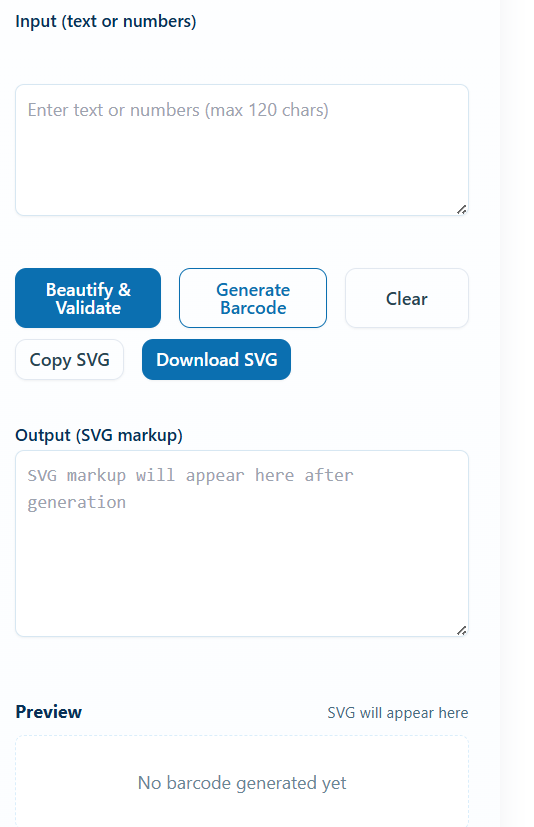
Step 2: Enter Your Data
Type or paste:
- Product number
- SKU
- Text or numeric code
Step 3: Choose Barcode Format
Select the barcode type that fits your needs (e.g., Code 128, EAN).
Step 4: Generate the Barcode
Click the generate button. Your barcode appears instantly.
Step 5: Download & Use
Download the barcode image and use it for:
- Printing
- Packaging
- Digital documents
Benefits of Online Barcode Generators vs Software
Why Online Tools Are Better
| Feature | Online Barcode Generator | Desktop Software |
|---|---|---|
| Installation | ❌ Not needed | ✅ Required |
| Speed | ⚡ Instant | ⏳ Slow |
| Cost | ✅ Free | 💰 Often paid |
| Accessibility | 🌍 Anywhere | 🖥️ Single device |
| Mobile-friendly | ✅ Yes | ❌ No |
Online tools like ConvertioHub save time, storage space, and money.
Helpful Tools You May Also Need
Along with barcode creation, these tools are commonly used by businesses:
- QR Code Generator — Create QR codes for URLs
- Online Unit Converter (for shipping & packaging)
FAQs – Free Barcode Generator
Is this barcode generator really free?
Yes. It’s completely free with no signup required.
Do I need to install anything?
No. Everything works directly in your browser.
Can I use the barcodes for commercial products?
Yes. You can use generated barcodes for business and commercial use.
Are the barcodes high quality?
Yes. They are scannable and suitable for printing.
Does ConvertioHub store my data?
No. Data is processed instantly and not stored.
Conclusion: Create Barcodes the Easy Way
Barcodes are essential for modern business, but creating them doesn’t have to be complicated.
With ConvertioHub’s free barcode generator, you can:
- Create barcodes instantly
- Avoid expensive software
- Work from any device
- Save time and effort