
Text Repeater Tool: How to Repeat Text Automatically (Beginner’s Guide)
Use the tool directly → Text Repeater
Introduction
Whether you’re preparing repetitive test data, creating fun text patterns, formatting content, or sending stylized messages, typing the same text again and again can be frustrating. That’s where a Text Repeater becomes incredibly useful.
The Text Repeater tool on ConvertioHub helps you repeat any text automatically—instantly, cleanly, and without manual typing. It’s perfect for beginners, content creators, developers, social media users, and anyone needing repeated text for formatting or fun.
This guide will show you how the tool works, real-life use cases, step-by-step instructions, benefits, FAQs, and more.
Beginner Explanation: What Is a Text Repeater?
A text repeater is a simple online tool that automatically duplicates text however many times you choose. You can repeat:
- A word
- A sentence
- An emoji
- A phrase
- Even whole paragraphs
This gives you quick repeated content without manually copying and pasting.
No technical knowledge needed — just type your text, choose how many repetitions you want, and the tool does the rest.
Common Real-Life Uses of a Text Repeater Tool
A Text Repeater is more useful than it initially sounds. Here are everyday scenarios where people use it:
✔ 1. Social Media Content
For creating fun texts, stylish repeated patterns, emoji spam (for birthdays, celebrations), or creative posts.
✔ 2. Testing & Development Repetition
Developers often need repeated strings to test:
- Form fields
- Character limits
- Stress testing
- UI alignment
✔ 3. Formatting Long Blocks of Text
Writers or editors may need placeholder repeated words/sentences to fill templates or demonstrate formatting.
✔ 4. Messaging Apps
People use repeated text for emphasis, excitement, or humor.
✔ 5. Creative Use Cases
- Emoji art
- ASCII-style patterns
- Decorative repeated captions
- Fun messages for groups or communities
Step-by-Step Guide: How to Use the Text Repeater Tool on ConvertioHub
Follow these simple steps to generate repeated text within seconds:
1. Open the Text Repeater Tool
Visit:
https://convertiohub.com/text-repeater-repeat-text-automatically/
This page loads the tool interface instantly—no login, no installation.
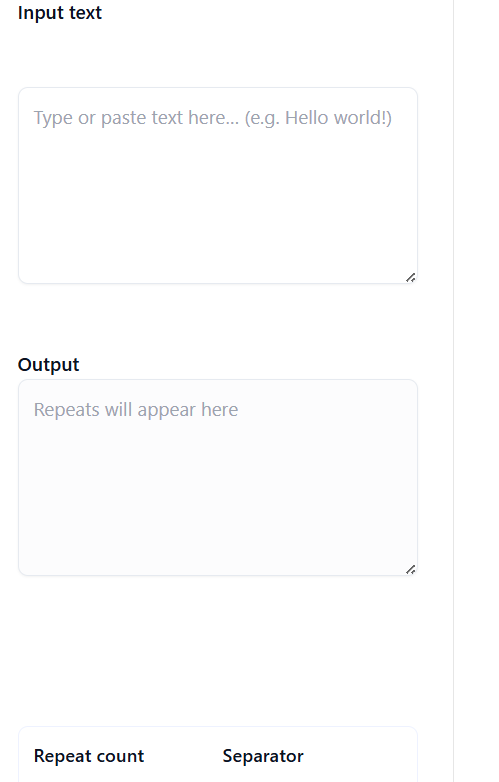
2. Enter the Text You Want to Repeat
Type or paste any text into the main input box.
Examples:
- “Hello”
- “Thank you!”
- “😊”
- “Testing message”
3. Choose How Many Times You Want to Repeat It
Use the number field to set:
- 5 repetitions
- 20 repetitions
- 100 repetitions
- or any number you need
The tool supports large repetitions efficiently.
4. Select Formatting Options
Some common formatting choices include:
- Add spaces between repetitions
- Add line breaks
- Keep everything in a single line
- Add separators (comma, dash, emoji, etc.)
5. Click ‘Generate’
The repeated output appears instantly below the tool.
6. Copy the Result
Click Copy to instantly transfer the output to your clipboard.
Paste it anywhere you need:
- Social media
- Text documents
- Development projects
- Notes apps
- Email templates
Benefits of Using an Online Text Repeater Instead of Software
✔ 1. No Installation Needed
Everything runs online—no apps to download, no storage required.
✔ 2. Faster Than Manual Repetition
Typing the same phrase dozens of times is slow; the tool does it in milliseconds.
✔ 3. Works on Any Device
Desktop, tablet, mobile — fully responsive.
✔ 4. Error-Free Output
No mistyped words, no extra spaces, no formatting mistakes.
✔ 5. Ideal for Quick Productivity
Repeat text, generate patterns, and format content without hassle.
Online tools like ConvertioHub’s Text Repeater are designed for speed, accessibility, and ease of use.
FAQs
1. Is the Text Repeater tool free to use?
Yes! The ConvertioHub Text Repeater is completely free and requires no signup.
2. Can I repeat emojis or symbols?
Absolutely. Emojis, symbols, and icons repeat just like normal text.
3. What’s the maximum number of repetitions allowed?
You can generate very large repetition counts — the tool is optimized to handle big outputs smoothly.
4. Can I add custom separators between repetitions?
Yes, you can add spaces, commas, line breaks, or any custom separator.
5. Can I use it for WhatsApp or social media messages?
Yes! Copy the repeated text and paste it into WhatsApp, Instagram, Facebook, X, or any messaging platform.
Conclusion
The Text Repeater tool on ConvertioHub is a fast, easy, and efficient way to duplicate any text automatically—perfect for fun messages, creative formatting, social media posts, development testing, and more.
If you want instant repeated text without typing manually, this tool will save you time and boost your productivity.
👉 Try the Text Repeater now and create repeated text in seconds: