
Introduction
Understanding your weight and overall health can feel confusing—especially with so many fitness metrics available today. The good news? One simple tool has been trusted for decades: the BMI Calculator.
A BMI calculator helps you quickly determine whether your weight falls into a healthy range. It’s beginner-friendly, easy to use, and requires only two things: your height and weight. Whether your goal is weight loss, fitness, or general wellness, knowing your BMI gives you a helpful starting point.
In this guide, you’ll learn what BMI means, how it works, how to calculate it, and how to use a BMI calculator step-by-step.
Beginner-Friendly Explanation: What Is BMI?
BMI stands for Body Mass Index. It’s a simple formula that compares your weight to your height and then categorizes your body weight into:
- Underweight
- Normal
- Overweight
- Obese
BMI is not a medical diagnosis—but it does give a basic overview of whether your weight is in a healthy range.
What a BMI Calculator Does
A BMI calculator automatically applies the formula for you:
BMI = Weight (kg) ÷ Height (m²)
No math required. You simply enter your numbers and get instant results.
Why BMI Still Matters in 2025
Even with modern health tools, BMI remains widely used because:
- It’s quick
- It’s accessible
- It gives an approximate health indicator
- It helps track long-term changes
Common Real-Life Uses of BMI
You’ll commonly see BMI used in:
1. Fitness Tracking
Many people use BMI as a starting benchmark when beginning a fitness journey.
2. Health Awareness
BMI helps you understand where you stand in basic health categories.
3. Diet & Nutrition Planning
Some nutritionists factor in BMI when recommending diet adjustments.
4. Workplace Wellness Programs
Companies offering wellness initiatives often use BMI as a baseline tool.
5. Insurance & Medical Records
Many systems still ask for BMI during health assessments.
Step-by-Step Guide: How to Use the BMI Calculator
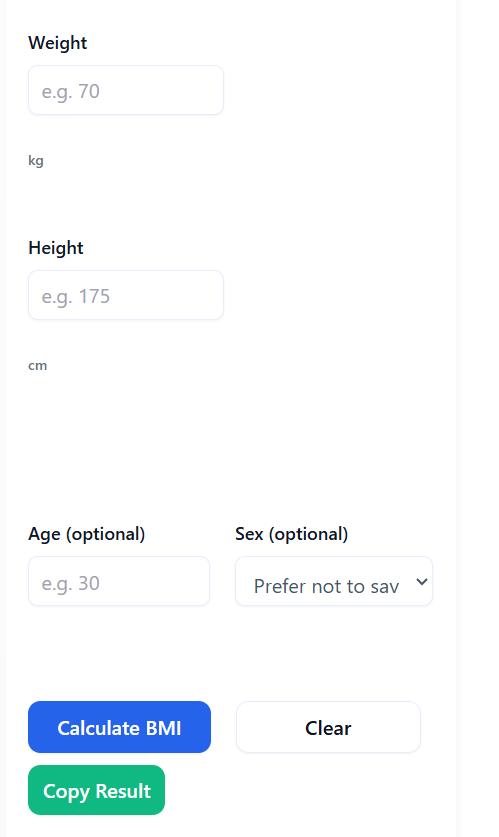
Below is the simplest way to calculate your BMI on ConvertioHub:
1. Open the BMI Calculator Page
Go to:
https://convertiohub.com/bmi-calculator/
2. Select Your Measurement System
Choose either:
- Metric (kg, cm)
- Imperial (lbs, feet/inches)
3. Enter Your Weight
Type your current weight in the input field.
4. Enter Your Height
Add your height—make sure to enter accurate measurements.
5. Click “Calculate BMI”
The tool instantly shows your BMI result.
6. Check Your Category
The calculator will tell you if you are:
- Underweight
- Normal weight
- Overweight
- Obese
7. Review the Result Carefully
Use your BMI as a general guide, not the final answer about your health.
Benefits of Online BMI Calculators vs. Software
1. No Installation Required
Unlike desktop programs, online BMI calculators run instantly on any device.
2. Accessible Anywhere
Works on mobile, tablet, or computer.
3. Saves Time
One click → instant results.
4. Beginner-Friendly
Simple input fields with no confusing menus.
5. No Technical Skills Needed
Perfect for people who want fast, no-fuss results.
FAQs
1. Is a BMI calculator accurate?
BMI is a general indicator—not a perfect one. It doesn’t measure muscle mass or body fat directly.
2. Do I need any medical knowledge to use a BMI calculator?
Not at all. Anyone can use it by simply entering height and weight.
3. Does BMI apply to athletes?
Not always. Athletes often have high muscle mass, which can increase BMI without being unhealthy.
4. Can BMI help me lose weight?
BMI itself doesn’t cause weight loss, but it helps set clear starting goals.
5. How often should I check my BMI?
Once every 2–4 weeks is enough for tracking progress.
Conclusion + CTA
A BMI calculator is one of the easiest ways to understand your current health baseline. With just two numbers—your height and weight—you can get a quick snapshot of where you stand and begin setting realistic health or fitness goals.
Ready to take the next step?
👉 Use the ConvertioHub BMI Calculator today and start tracking your wellness journey with confidence.