
Use the tool directly → QR Code Generator — Free & Unlimited
Introduction: Why You Need a Free QR Code Generator
QR codes are everywhere today — on restaurant menus, product packaging, business cards, websites, and even social media posts. They make sharing information fast, touch-free, and convenient.
But many people face the same problem:
Most QR code tools limit usage, add watermarks, or require paid plans just to download or reuse QR codes.
That’s exactly where ConvertioHub’s QR Code Generator Free Unlimited tool helps. It allows anyone — beginners, businesses, students, and marketers — to generate unlimited QR codes online for free, without signup or hidden restrictions.
👉 Try the tool here: QR Code Generator — Free & Unlimited QR Codes
Beginner-Friendly Explanation: What Is a QR Code?
A QR code (Quick Response code) is a square barcode that stores information like:
- Website links
- Text messages
- Phone numbers
- WiFi details
- Email addresses
When someone scans it using a smartphone camera, the stored information opens instantly.
Static vs Dynamic QR Codes (Simple Explanation)
- Static QR Codes
- Fixed information
- Free and permanent
- Perfect for URLs, text, and contact details
- Dynamic QR Codes
- Editable after creation
- Usually require paid tools
✅ ConvertioHub focuses on simple, static QR codes, which are ideal for most everyday and business needs.
Real-Life Uses of QR Codes
QR codes are incredibly versatile. Here’s how people commonly use them:
- Business Cards: Share website or contact info instantly
- Marketing Flyers: Drive traffic to landing pages
- Restaurants: Digital menus via QR scan
- WiFi Sharing: Let guests connect without typing passwords
- Product Packaging: Add instructions or support links
Because QR codes are image-based, they:
- Maintain high quality
- Work well with logos
- Can be printed or shared digitally
- Are easy to reuse anywhere
How to Generate a QR Code Online (Step-by-Step)
Creating a QR code using ConvertioHub is simple and fast.
Step 1: Open the QR Code Generator
Go to: QR Code Generator — Free & Unlimited QR Codes
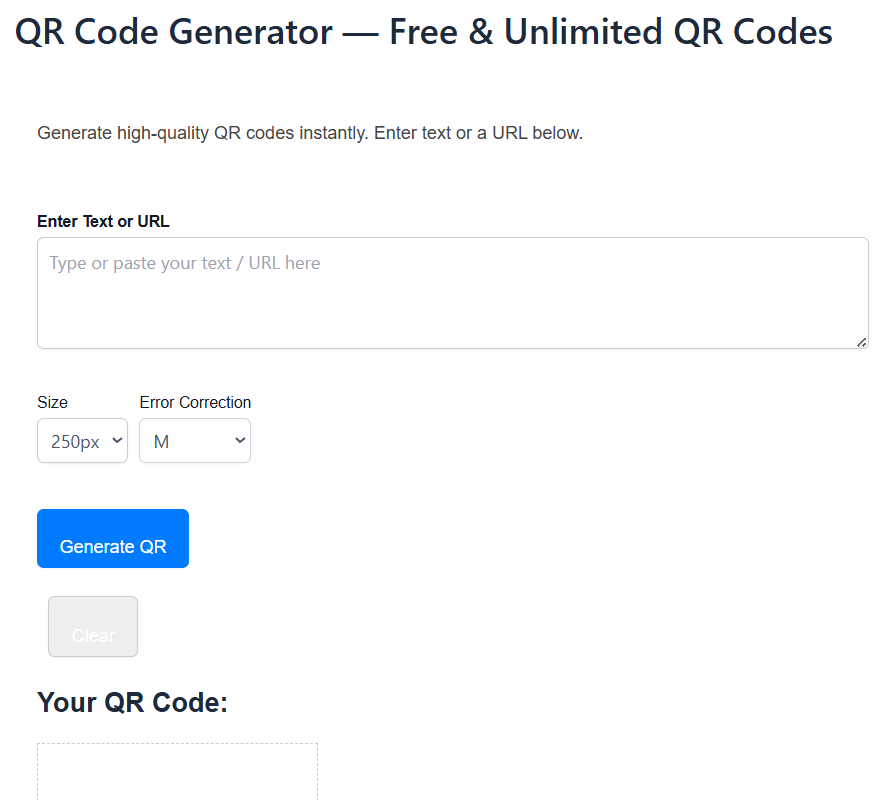
Step 2: Choose the QR Code Type
Select what you want to convert:
- URL
- Text
- Phone number
- WiFi details
Step 3: Enter Your Content
Paste your link or text into the input field.
Step 4: Generate & Download
Click Generate QR Code, then download instantly — no watermark, no limit.
Benefits of Online QR Code Generators vs Software
Why use an online QR code generator instead of desktop software?
Online Tools (Like ConvertioHub)
- ✅ No installation required
- ✅ Works on mobile & desktop
- ✅ Instant access anywhere
- ✅ Free & unlimited
- ✅ Beginner-friendly
Desktop Software
- ❌ Requires installation
- ❌ Often paid
- ❌ Device-specific
- ❌ Updates needed
For quick, everyday QR code creation, online tools clearly win.
Useful ConvertioHub Tools You May Like
If you work with digital content, these free tools can help:
Each tool is free, browser-based, and designed for simplicity.
FAQs – QR Code Generator Free Unlimited
1. Is ConvertioHub’s QR Code Generator really free?
Yes. You can create unlimited QR codes with no signup or payment.
2. Are there watermarks on downloaded QR codes?
No. All QR codes are clean and watermark-free.
3. Can I use these QR codes for commercial purposes?
Yes. You can use them for business, marketing, or personal projects.
4. Do QR codes expire?
No. Static QR codes generated here never expire.
5. Does it work on mobile devices?
Yes. The tool is fully mobile-friendly and works on all browsers.
Conclusion: Start Creating Unlimited QR Codes Today
If you’re looking for a QR code generator free unlimited, ConvertioHub offers one of the simplest and most reliable tools available online.
No signups.
No watermarks.
No limits.
👉 Create your first QR code now: QR Code Generator — Free & Unlimited QR Codes