
Introduction: Why You Need an Online Unit Converter Today
Use the tool directly → Unit Converter
Have you ever needed to convert kilometers to miles, kilograms to pounds, or Celsius to Fahrenheit—and didn’t know where to start? Whether you’re a student, professional, traveler, or freelancer, unit conversion is a daily, real-world need.
Manually calculating conversions can be confusing and time-consuming. One small mistake can lead to wrong results, poor decisions, or wasted effort. That’s why using a reliable online unit converter is the easiest and safest solution.
The Unit Converter Tool by ConvertioHub helps you convert units quickly online, without installing any software or dealing with complex formulas. It’s simple, fast, and built for everyone—even complete beginners.
Beginner Explanation: What Is Unit Conversion?
Unit conversion simply means changing a measurement from one unit to another without changing its actual value.
For example:
- 1 kilometer = 0.62 miles
- 1 kilogram = 2.2 pounds
- 100°C = 212°F
Instead of memorizing formulas, an online unit converter does the math instantly and accurately for you.
Common Real-Life Uses of a Unit Converter
People use unit converters more often than they realize. Here are some everyday examples:
- Students converting measurements for homework and exams
- Travelers converting distance, speed, or temperature abroad
- Online shoppers checking product dimensions and weights
- Engineers & professionals handling international measurement standards
- Fitness enthusiasts tracking body weight and workout metrics
Just like tools such as a percentage calculator help with quick math, a unit converter removes confusion from measurements.
How to Use the ConvertioHub Unit Converter (Step-by-Step)
Using the tool is extremely easy—even if you’ve never used a converter before.
Step-by-Step Guide
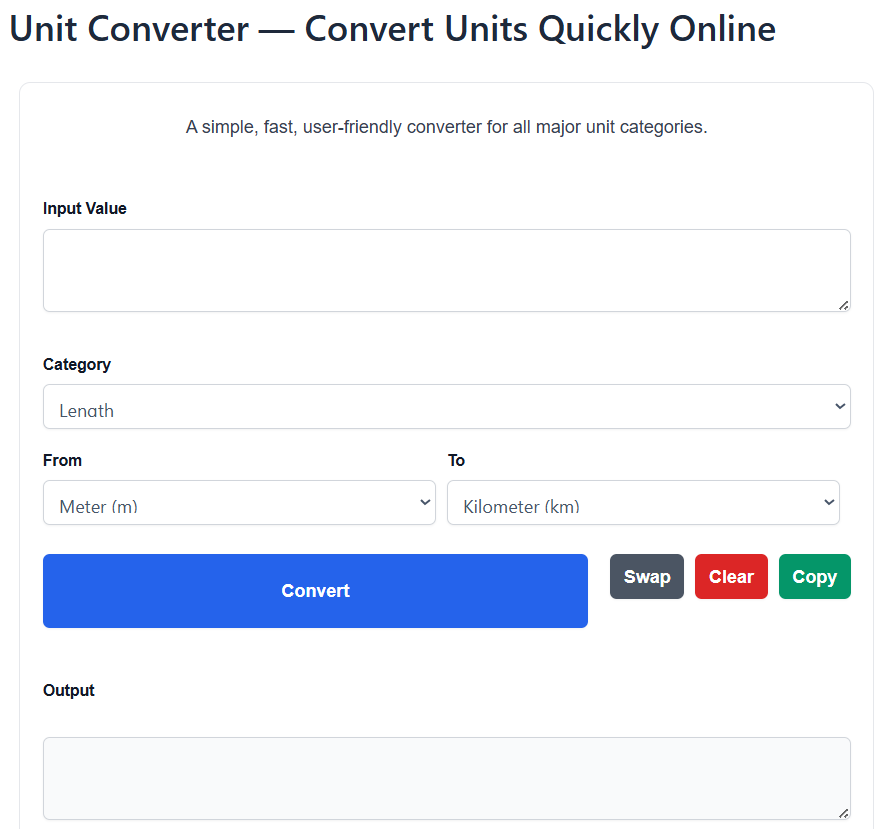
- Open the Unit Converter Tool
Visit the ConvertioHub unit converter page. - Select the Unit Type
Choose what you want to convert (length, weight, temperature, etc.). - Enter Your Value
Type the number you want to convert. - Choose “From” and “To” Units
Select the original unit and the unit you want to convert into. - Get Instant Results
The converted value appears instantly—no refresh required.
Benefits of Online Unit Converters vs Desktop Software
Many people still use desktop software or manual calculations. Here’s why an online unit converter is better:
Online Unit Converter
- ✅ No installation required
- ✅ Works on mobile, tablet, and desktop
- ✅ Faster results
- ✅ Always updated
- ✅ Free to use
Desktop Software
- ❌ Requires installation
- ❌ Takes storage space
- ❌ Not mobile-friendly
- ❌ Often paid or outdated
Just like online tools such as Remove Line Breaks simplify text formatting instantly, online unit converters save time and effort.
Why Choose ConvertioHub’s Unit Converter?
There are many converters online, but ConvertioHub stands out because it offers:
- Beginner-friendly design
- Fast and accurate conversions
- No ads cluttering the interface
- Works instantly on all devices
- 100% free with no signup required
If you already use tools like the Discount Calculator or Text Repeater, you’ll feel right at home with this converter.
Frequently Asked Questions (FAQs)
1. Is this online unit converter free to use?
Yes. The ConvertioHub unit converter is completely free with no hidden charges.
2. Do I need to create an account?
No registration or login is required. Just open the tool and start converting.
3. Is the unit converter accurate?
Yes. The tool uses standard, globally accepted conversion values for accuracy.
4. Can I use it on my phone?
Absolutely. The converter is fully mobile-friendly and works on all devices.
5. What types of units can I convert?
You can convert common units such as length, weight, temperature, and more.
Conclusion: Convert Units the Smart Way
Unit conversion doesn’t have to be confusing or time-consuming. With the ConvertioHub Online Unit Converter, you can convert units quickly, accurately, and effortlessly—anytime, anywhere.
Whether you’re studying, traveling, shopping online, or working professionally, this tool saves time and eliminates errors.