
Use the tool directly → JPG to PNG Converter.
Have you ever tried to put a logo on a presentation slide or a website, only to find it has an ugly white box around it? Or maybe you’ve noticed that your text screenshots look a little fuzzy and pixelated when you save them?
If you nodded your head, you aren’t alone. This is a common frustration for students, office workers, and creators everywhere. The culprit is usually the file format. You are likely using a JPG, but what you really need is a PNG.
The good news? You don’t need expensive software like Photoshop to fix this. In this guide, we will show you exactly how to convert JPG to PNG online using ConvertioHub. It is free, fast, and incredibly easy.
Let’s dive in!
What Are JPG and PNG? (And Why Does It Matter?)
Before we get into the “how,” let’s briefly touch on the “what.” Understanding the difference between these two image formats will help you decide when to use which.
What is a JPG?
JPG (or JPEG) stands for Joint Photographic Experts Group. It is the standard format for digital photographs.
- Best for: Photos with lots of colors and gradients.
- The Downside: It uses “lossy” compression. Every time you save a JPG, it loses a tiny bit of quality. Also, JPGs do not support transparent backgrounds.
What is a PNG?
PNG stands for Portable Network Graphics.
- Best for: Logos, graphics with text, screenshots, and images requiring transparency.
- The Upside: It uses “lossless” compression, meaning it keeps sharp details and crisp edges. Most importantly, PNGs support transparency.
Why You Need This Tool in Daily Life
You might be thinking, “I just take photos on my phone; why do I need to convert them?” You’d be surprised how often this comes in handy!
Here are three scenarios where you need to convert JPG to PNG online:
- Creating Presentations: If you are making a PowerPoint or Google Slide, you want your images to blend seamlessly into your background. A PNG allows you to remove that boxy white background.
- Social Media Graphics: If you are uploading a quote or a meme with text, JPGs can sometimes create “artifacts” (weird fuzzy dots) around the letters. PNGs keep text looking razor-sharp.
- Web Design & Logos: If you are building a profile or a website, your logo needs to sit on top of colored headers without a white square behind it.
See the image below for a visual representation of the conversion process.
Step-by-Step Guide: How to Use ConvertioHub
Ready to switch formats? We’ve made the process on ConvertioHub as simple as possible. You don’t need to sign up, install anything, or pay a cent.
Follow these four simple steps:
Step 1: Go to the Converter Tool
Click this link to open the tool directly: JPG to PNG Converter.
Tip: Bookmark this page so you can find it easily next time!
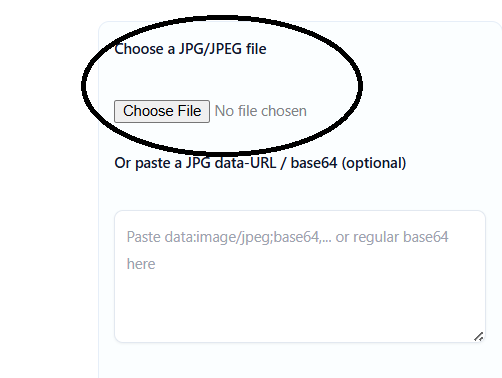
Step 2: Upload Your JPG File
Once the page loads, you will see a big, friendly box.
- Click the “Choose File” button to select an image from your computer or phone.
- Alternatively, you can drag and drop your image directly onto the page.
Step 3: Let the Magic Happen
As soon as you upload the file, our system automatically begins the conversion process. You don’t need to tweak settings or worry about technical jargon. ConvertioHub handles the heavy lifting to ensure your new PNG retains the highest possible quality.
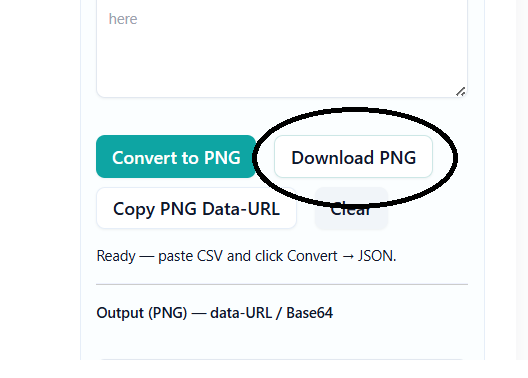
Step 4: Download Your New PNG
In just a few seconds, you will see a “Download” button appear. Click it, and your new, high-quality PNG file will be saved to your device.
Benefits of Using Online Tools vs. Software
You might be wondering, “Should I just download a program to do this?”
Honest answer? Probably not. Unless you are a professional graphic designer, downloading software is usually overkill. Here is why using an online tool like ConvertioHub is the smarter choice for most people:
- Zero Installation: No need to clog up your hard drive with heavy software.
- Mobile Friendly: You can convert JPG to PNG online directly from your iPhone or Android device.
- 100% Free: Many software programs require a subscription. ConvertioHub is free to use.
- Speed: Opening Photoshop takes time. Our website loads in milliseconds.
- Safety: We process your files securely and don’t store them permanently, keeping your data safe.
Frequently Asked Questions (FAQs)
We know you might still have a few questions. Here are the answers to the most common queries we get about image conversion.
1. Is ConvertioHub really free?
Yes! Our JPG to PNG converter is completely free to use. You can convert your images without pulling out your credit card.
2. Will converting JPG to PNG improve the quality of a blurry photo?
Not exactly. Converting to PNG stops the quality from getting worse (because it is lossless), but it cannot magically add detail that wasn’t there in the original blurry photo. However, it is the best format to prevent further degradation.
3. How long does the conversion take?
It is super fast! For most standard images, the process takes less than 5 seconds, depending on your internet connection speed.
4. Can I use this on my phone?
Absolutely. ConvertioHub is optimized for mobile browsers. You can upload a photo from your camera roll and download the converted PNG right back to your phone.
5. Is it safe to upload my personal photos?
Security is our priority. Your files are processed securely for the conversion and are not publicly accessible. You can use our tools with peace of mind.
Conclusion
Dealing with incompatible image formats doesn’t have to be a headache. whether you are a student working on a project, a freelancer polishing a presentation, or just someone who wants their memes to look crisp, switching from JPG to PNG is a small change that makes a big difference.
Now that you know how to convert JPG to PNG online, why not give it a try? Stop settling for pixelated text and white backgrounds.
Ready to upgrade your images?
👉 Try the JPG to PNG tool now for free on ConvertioHub.com and simplify your workflow instantly!
Don’t forget to check out our other tools for PNG to JPG and image compression to keep your digital life running smoothly!