
How to Reduce HTML Size for Faster Websites (Beginner Guide)
Use the tool directly → HTML Minifier
Introduction
If your website feels slow or heavy, the issue might not be your server — it might simply be your HTML file size. Extra spaces, blank lines, and unnecessary formatting make your HTML bulkier than it needs to be.
This is exactly why tools like the HTML Minifier on ConvertioHub exist. They clean and compress your HTML so your pages load faster — even if you’re a complete beginner with no technical background.
Whether you build websites, edit templates, or manage content online, this guide will show you how to use the tool the easy way.
What Is HTML? (Beginner Explanation)
HTML (HyperText Markup Language) is the basic building block of web pages. It tells the browser what to display — text, images, layouts, and more.
What Is HTML Minification?
It simply means:
- removing unnecessary spaces
- removing extra line breaks
- removing comments
- reducing file size
All without changing how the website looks.
Think of it like compressing a long sentence into a clean, efficient version — same meaning, faster to read.
Why Minify HTML? (Real-Life Uses)
Minifying HTML is essential for:
✔ Faster website load speed
A lighter HTML file loads quicker — especially important for mobile users on slower networks.
If you test your site on mobile devices like older phones or tablets, speed differences become very noticeable.
✔ Better SEO
Search engines reward fast websites. Faster HTML = better performance score.
✔ Cleaner code for developers
Minified HTML removes clutter and makes your site easier to maintain.
✔ Reduced hosting and bandwidth usage
Smaller files mean faster transfers and lower resource usage.
How to Use ConvertioHub’s HTML Minifier (Step-By-Step Guide)
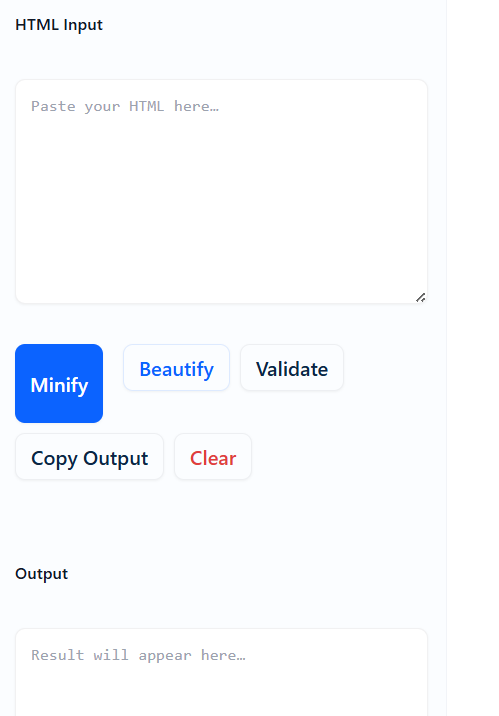
Follow this simple process:
1. Open the HTML Minifier Tool
Go to: convertiohub.com/html-minifier/
You’ll see a clean interface with a text box where you can paste your HTML code.
2. Paste Your HTML Code
Copy your HTML from your editor, CMS, or template and paste it in the input box.
3. Choose Minification Options
Depending on the tool version, you may see options like:
- Remove comments
- Remove empty lines
- Collapse whitespace
- Remove redundant attributes
If you’re a beginner, simply use the default settings.
4. Click “Minify HTML”
Within seconds, the tool generates compressed, clean HTML.
5. Copy the Output
Click the Copy button or manually select the result.
6. Replace Your Old HTML
Paste the optimized version back into your site, file, or CMS.
7. Test Your Page
Open your page again — it will now load faster and score better on performance tools.
Benefits of Online HTML Minifiers vs Desktop Software
| Online Tools | Desktop Software |
|---|---|
| No installation required | Requires downloads / setup |
| Works on any device | Limited to your machine |
| Super fast — runs instantly | Heavier CPU usage |
| Accessible on mobile/tablet | Not always mobile-friendly |
| Beginner friendly | Often technical |
Using ConvertioHub’s online HTML Minifier means you can optimize your code from:
- laptop
- phone
- tablet
- office computer
- shared workspace
- even on the go
It’s the simplest way to keep your site clean and fast.
FAQs
1. Does minifying HTML change the look of my website?
No. Minification only removes unnecessary characters — your design remains identical.
2. Is HTML minification safe?
Yes. It doesn’t modify your content; it only compresses code formatting.
3. Can I un-minify HTML later?
You can use an HTML beautifier, but always keep a backup of your original file.
4. Does minifying HTML improve SEO?
Absolutely. Faster pages help with better rankings and user experience.
5. Can beginners use this tool?
Yes. ConvertioHub’s interface is simple — copy, paste, click, and done.
Conclusion + Strong CTA
Using an online HTML Minifier is one of the easiest ways to boost website speed, reduce page weight, and optimize overall performance — even if you’re not a developer.
ConvertioHub’s HTML Minifier does all the heavy lifting for you.
No software. No coding. No stress.
👉 Try the HTML Minifier on ConvertioHub today and make your website faster in seconds.
Your visitors (and search engines) will thank you!