
Character Counter Tool: Count Characters & Words Instantly for Better Writing
Use the tool directly → Character Counter

Whether you’re writing a tweet, crafting an Instagram caption, preparing an SEO title, or submitting an academic assignment, text length matters. Nothing is more frustrating than writing something great—only to find out it’s too long to post.
That’s exactly why the Character Counter Tool on ConvertioHub exists: to make counting characters and words accurate, effortless, and instant.
In this guide, you’ll learn how the tool works, why character limits matter, and how to use it effectively—even if you’re a complete beginner.
What Is a Character Counter Tool? (Beginner-Friendly Explanation)
A character counter tool is a simple online utility that tells you exactly:
- How many characters your text contains
- How many words you have written
- Whether your text fits within a required limit
Characters include:
letters, numbers, symbols, spaces, and punctuation marks.
Word count includes:
groups of letters separated by spaces.
Why Counting Characters Matters
Different platforms have strict limits:
- Twitter/X: 280 characters
- TikTok captions: 2,200 characters
- Meta titles for SEO: 50–60 characters
- Meta descriptions: 150–160 characters
- SMS messages: 160 characters
- LinkedIn posts: 3,000 characters
Instead of guessing, you can paste your text into the character counter tool and get instant accurate results.
Why Would You Need a Character Counter Tool?
A character counter isn’t just for writers—it’s for anyone who works with text. Here are the most common real-life uses:
1. Social Media Posts
Platforms like X/Twitter, Instagram, Facebook, and LinkedIn have strict limits.
A counter helps you avoid cutting text at the last moment.
2. SEO Titles & Meta Descriptions
Google prefers:
- Titles: 50–60 characters
- Descriptions: 150–160 characters
Using an online character count ensures you stay within ideal SEO ranges.
3. Students & Academics
Assignments sometimes require:
- 250-word discussion posts
- 500-word essays
- Abstracts under 200 words
The tool guarantees accuracy.
4. Writers & Bloggers
Copywriters and bloggers often aim for:
- Specific line lengths
- Clean formatting
- Consistent style
A counter keeps everything polished.
If you also work with visuals, you may want to optimize image sizes too — try the Image Resizer Tool on ConvertioHub:
👉 https://convertiohub.com/image-resizer/
5. Job Applications
Resumes often need:
- Bullet points under 120 characters
- Summaries under 300 characters
A text length checker makes it easy.
How to Use the Character Counter Tool (Step-by-Step Guide)
Using the tool at ConvertioHub.com is quick and simple. Here is a beginner-friendly walkthrough anyone can follow:
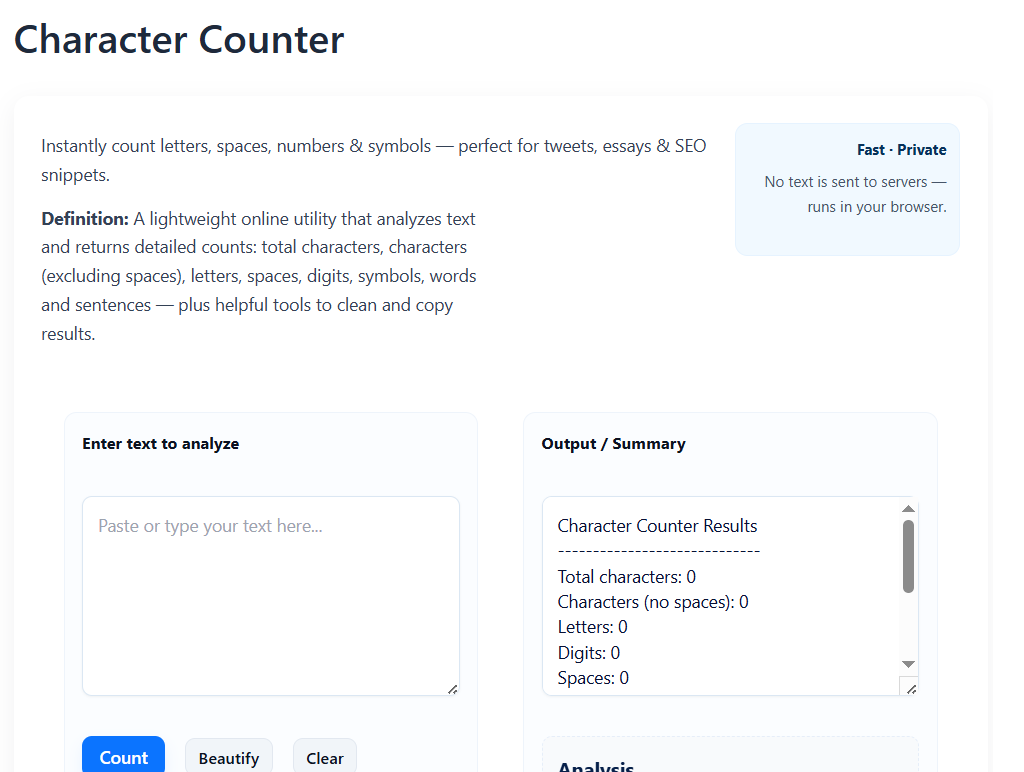
Step 1: Open the Character Counter Tool
Go to:
👉 https://convertiohub.com/character-counter/
Step 2: Type or Paste Your Text
Click inside the text box.
You can either:
- start typing manually
- or paste any text you’ve written elsewhere
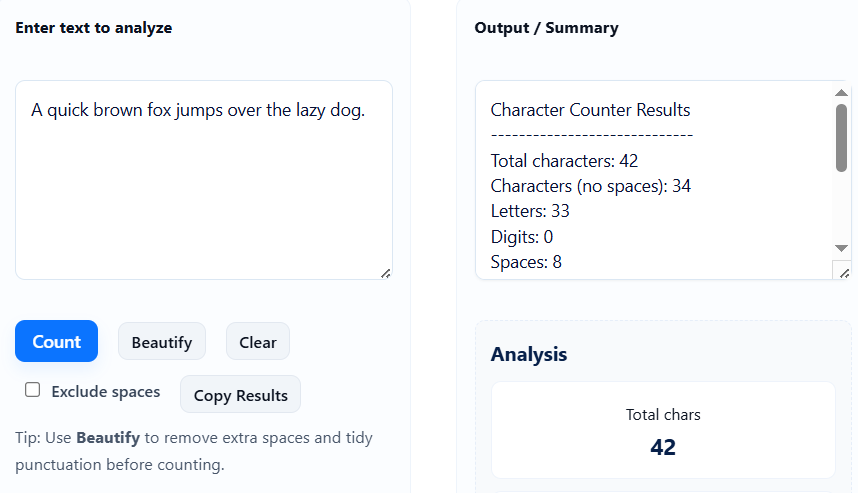
Step 3: See Instant Results
As soon as you type or paste text, you’ll see:
- Character Count
- Word Count
- Space count (if included by tool)
These update in real time.
Step 4: Adjust Your Text as Needed
If you’re writing for:
- SEO
- Social media
- Job applications
- Emails
- Ads
…edit the text until it fits your desired limit.
Benefits of Online Character Counters vs Software
Should you use an online tool or install software? Here’s why the online version is better for most users:
1. No Installation Needed
You don’t have to download anything. Just open the webpage and start counting.
2. Works on Any Device
Use it on:
- Mobile
- Tablet
- Desktop
- Chromebook
The character counter tool runs everywhere.
3. Faster Than Word Processors
Microsoft Word and Google Docs have counters, but:
- They require extra clicks
- They sometimes count differently
- They load slower
Online counters are instant.
4. Perfect for Quick Tasks
When writing tweets, captions, or SEO meta tags, opening a full editor is unnecessary.
5. Free and Accessible
No logins, no limits, no subscriptions.
FAQs About the Character Counter Tool
1. Is the Character Counter Tool free to use?
Yes! The tool is 100% free and requires no account or installation.
2. Is my text saved or stored anywhere?
No. Everything you type stays in your browser. Nothing is uploaded or saved.
3. Can I use the tool on my phone?
Absolutely. The tool is mobile-friendly and works on all devices.
4. Does it count spaces as characters?
Yes—spaces, punctuation, symbols, and emojis all count as characters.
5. Can I check word count too?
Yes. The tool shows both word count and character count instantly.
6. Can I use this for SEO meta tags?
Definitely. It’s perfect for writing titles (50–60 chars) and descriptions (150–160 chars).
Conclusion + Strong Call-to-Action
The Character Counter Tool at ConvertioHub makes writing easier, more accurate, and frustration-free. Whether you’re posting on social media, optimizing for SEO, or completing a school assignment, you can check your text length instantly—without downloads or login.
👉 Try the Character Counter Tool now for free on ConvertioHub.com and make your writing clear, clean, and perfectly within limits!