
Use the tool directly → Color Picker
Introduction: Why You Need an HTML Color Picker
Choosing the right color is one of the most important steps in web design, branding, and UI creation. But remembering color codes or guessing shades can be frustrating—especially for beginners.
That’s where an HTML Color Picker comes in.
Instead of memorizing HEX codes or installing heavy software, you can pick any color visually and instantly get its HEX value using an online tool. Whether you’re a developer, designer, blogger, or student, this makes color selection fast, accurate, and stress-free.
👉 ConvertioHub’s HTML Color Picker Tool lets you choose colors in real time and copy HEX values with one click:
Beginner Explanation: What Is an HTML Color Picker?
Let’s keep this simple.
An HTML Color Picker is an online tool that allows you to:
- Select a color visually
- Instantly see its HEX color code
- Use that code in websites, apps, or designs
What Is a HEX Color Code?
A HEX color code is a six-character value (like #FF5733) that tells browsers exactly which color to display.
You’ll commonly see HEX colors used in:
- HTML & CSS
- Website themes
- Logos
- Buttons and backgrounds
No technical knowledge needed—just pick a color and copy the code.
Common Real-Life Uses of HEX Colors
HEX colors are used everywhere online. Here’s how people use them daily:
- Website Design: Backgrounds, text, borders, buttons
- Branding & Logos: Keeping brand colors consistent
- UI/UX Design: Matching app elements perfectly
- Image Editing: Choosing overlay and accent colors
- Marketing Graphics: Social media posts and ads
If you’ve ever asked, “What exact color is this?” — an HTML Color Picker solves that instantly.
How to Use the HTML Color Picker (Step-by-Step)
Using ConvertioHub’s tool is extremely easy—even if you’re a complete beginner.
Step 1: Open the Tool
Visit:
🔗 https://convertiohub.com/color-picker-html-hex-color-picker-tool/
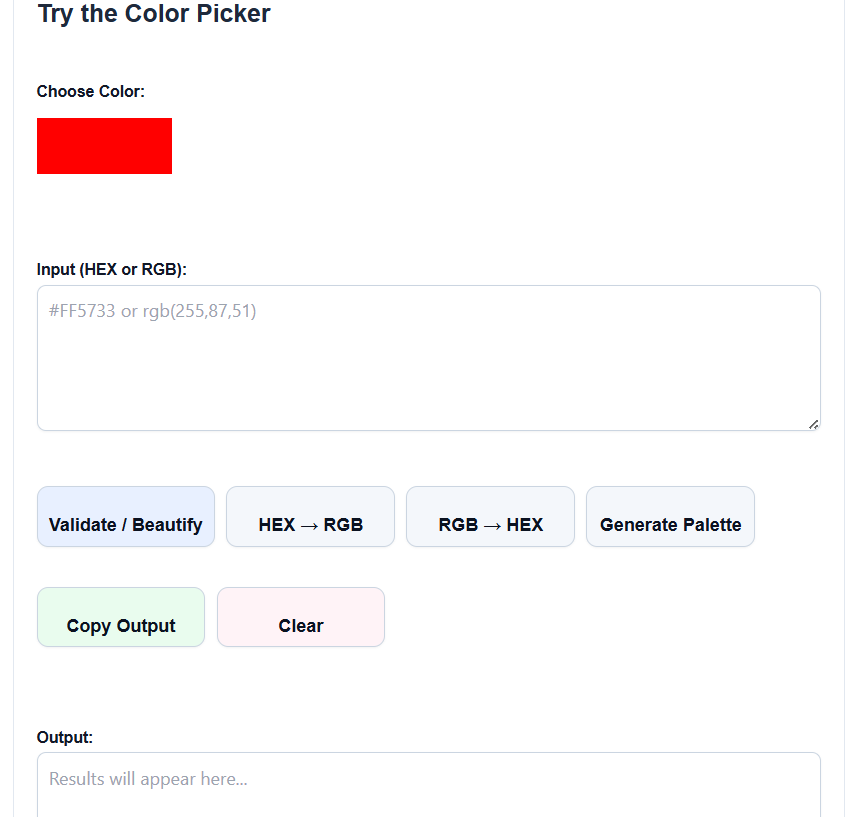
Step 2: Select a Color
Use the color slider and selector to choose your desired shade.
Step 3: Copy the HEX Code
The HEX color code updates instantly.
Click to copy it with one tap.
Step 4: Use It Anywhere
Paste the HEX code into:
- HTML or CSS files
- Design tools
- Website builders
- Branding documents
That’s it—no signup, no downloads, no learning curve.
Benefits of Online Color Pickers vs Desktop Software
Why choose an online HTML Color Picker instead of software like Photoshop?
✅ Online Tools (Like ConvertioHub)
- No installation required
- Works on mobile, tablet, and desktop
- Fast and lightweight
- Beginner-friendly
- 100% free
❌ Desktop Software
- Large file sizes
- Requires installation
- Paid subscriptions
- Overkill for simple color picking
For quick and accurate color selection, online tools win every time.
Why Use ConvertioHub’s HTML Color Picker?
Here’s what makes ConvertioHub stand out:
- 🎯 Instant HEX color output
- 🚀 Fast and responsive tool
- 📱 Mobile-friendly interface
- 🔐 No login or tracking
- 💯 Completely free to use
Explore more free tools here:
🔗 https://convertiohub.com/
FAQs – HTML Color Picker Tool
1. What is the best free HTML Color Picker?
ConvertioHub’s HTML Color Picker is free, fast, and beginner-friendly with instant HEX color results.
2. Can I use HEX colors for CSS?
Yes. HEX colors are widely used in CSS for backgrounds, text, borders, and more.
3. Does this tool work on mobile?
Absolutely. The color picker works smoothly on mobile phones and tablets.
4. Do I need to download anything?
No. This is a 100% online tool—just open and use it.
5. Is this tool suitable for beginners?
Yes. It’s designed for beginners, bloggers, students, and professionals alike.
Conclusion: Pick Perfect Colors in Seconds 🎯
Choosing colors doesn’t have to be complicated.
With ConvertioHub’s HTML Color Picker, you can visually select any color and instantly get its HEX code—no design skills or software required.
🚀 Start picking colors now and simplify your design workflow:
👉 https://convertiohub.com/color-picker-html-hex-color-picker-tool/